Resume in LaTeX
My resume used to live in Word. A normal file: edit the text, export to PDF, send it. For the history of changes I had a separate Git repository, where I committed a new version from time to time.
It was workable. But a Word file in Git is still basically a blob: the history of changes is not really visible.
At some point it became easier to move everything to LaTeX. The source is plain text. Open it in an editor, edit, compile, get a PDF. Git shows a normal diff. Repeated pieces can be moved into commands, so I do not have to search for them by hand through the document.
Not that this is the one correct way to do it. It just turned out to be calmer for a resume that has to be updated from time to time and still stay reasonably tidy.
Docker file for working with LaTeX
You do not have to install LaTeX locally. It can be built through Docker. This is the Docker file that worked for me:
FROM debian:buster-slim

RUN apt-get update && \
    apt-get install --no-install-recommends -y \
        biber=2.12-2 \
        latexmk=1:4.61-0.1 \
        texlive-full=2018.20190227-2 && \
        rm -rf /var/lib/apt/lists/*

WORKDIR /tmp
Build the image:
docker build -t latex .Build the document:
docker run -v `pwd`:/tmp latex pdflatex cv.texAfter that, cv.pdf will appear next to the source file.
Source: joshfinnie.com/blog/latex-through-docker.
Useful Resources
There are many resume templates on Overleaf: Overleaf Templates
I mostly looked there for the general structure: columns, headings, spacing, which packages people include. After that it still turns into fitting everything around your own text.
My Resume Template
This is what I ended up with:
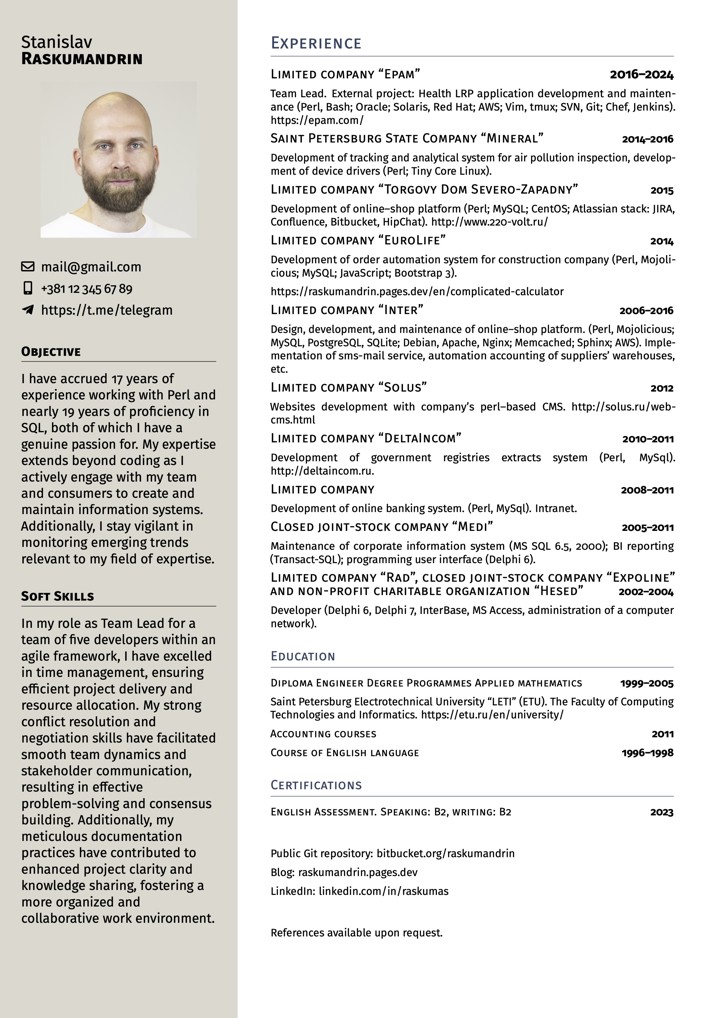
And the source:
% !TeX spellcheck = en_GB
% !TeX program = pdflatex

\documentclass[11pt, a4paper]{article}

\usepackage[T1]{fontenc}     % We are using pdfLaTeX,
\usepackage[utf8]{inputenc}  % hence this preparation
\usepackage[british]{babel}
\usepackage[left = 0mm, right = 0mm, top = 8mm, bottom = -8mm]{geometry}
\usepackage[stretch = 25, shrink = 25, tracking=true, letterspace=30]{microtype}
\usepackage{graphicx}        % To insert pictures
\usepackage{xcolor}          % To add colour to the document
\usepackage{marvosym}        % Provides icons for the contact details
\usepackage{fontawesome5}
%\usepackage{fontspec}
%\setmainfont{Merriweather}
\usepackage[us]{datetime}
\renewcommand{\dateseparator}{, }

\usepackage{enumitem}        % To redefine spacing in lists
\setlist{parsep = 0pt, topsep = 0pt, partopsep = 1pt, itemsep = 1pt, leftmargin = 6mm}

\usepackage{FiraSans}        % Change this to use any font, but keep it simple
\renewcommand{\familydefault}{\sfdefault}

%%%%%%% USER COMMAND DEFINITIONS %%%%%%%%%%%%%%%%%%%%%%%%%%%
% These are the real workhorses of this template

\newcommand{\dates}[1]{\hfill\mbox{\footnotesize\textbf{#1}}}
\newcommand{\is}{\par\vskip.5ex plus .4ex} % Item spacing
\newcommand{\smaller}[1]{{\small$\diamond$\ #1}}
\newcommand{\headleft}[1]{\vspace*{3ex}\textsc{\textbf{#1}}\par%
    \vspace*{-1.5ex}\hrulefill\par\vspace*{0.7ex}}
\newcommand{\headright}[1]{\vspace*{2.5ex}\textsc{\Large#1}\par%
     \vspace*{-2ex}{\hrulefill}\par}
%%%%%%%%%%%%%%%%%%%%%%%%%%%%%%%%%%%%%%%%%%%%%%%%%%%%%%%%%%%%

\usepackage[colorlinks = true, urlcolor = black, linkcolor = black]{hyperref}

\begin{document}
\vspace{1.5cm}

% Style definitions -- killing the unnecessary space and adding the skips explicitly
\setlength{\topskip}{0pt}
\setlength{\parindent}{0pt}
\setlength{\parskip}{0pt}
\setlength{\fboxsep}{0pt}
\pagestyle{empty}
\raggedbottom


\hspace{0.5cm}
\begin{minipage}[t]{0.33\textwidth} %% Left column -- outer definition
%  Left column -- top dark rectangle
\colorbox{white}{\begin{minipage}[t][5mm][t]{\textwidth}\null\hfill\null\end{minipage}}

\vspace{-.2ex} % Eliminates the small gap

\colorbox{white}{\color{black}  %% LEFT BOX
\kern0.09\textwidth\relax% Left margin provided explicitly
\begin{minipage}[t][293mm][t]{0.82\textwidth}
\raggedright
\vspace*{2.5ex}

\Large Stanislav

\textbf{\textsc{Raskumandrin}} \normalsize

% Centering without extra vertical spacing
\null\hfill\includegraphics[width=0.80\textwidth]{gpt-avatar}\hfill\null

\vspace*{3ex} % Extra space after the picture

% https://ctan.org/pkg/fontawesome5
% http://mirrors.ibiblio.org/CTAN/fonts/fontawesome5/doc/fontawesome5.pdf

\noindent
\begin{tabular}{@{}c@{\hspace{0.5em}}l@{}}
\faEnvelope[regular] & \href{mailto:gmail@gmail.com}{gmail@gmail.com} \\[0.75ex]
\faMobile* & \href{tel:+381123456789}{+381\,12\,345\,67\,89} \\[0.75ex]
\faTelegramPlane & \href{https://t.me/telegram}{https://t.me/telegram}
\end{tabular}

\vspace*{0.75ex}

\headleft{Objective}
With 17 years in Perl and 19 in SQL, I build and maintain data systems that stay clear, stable, and practical.
I work closely with teams and users, keeping focus on real needs and reliable delivery.
Stay aware of new technologies that help make work faster and cleaner.

\headleft{LLM Use}
I use Copilot, agents, and different LLMs in daily work — for coding, text, and data tasks.
Each tool supports precision and saves time, helping me keep focus on logic instead of routine.

\headleft{Soft Skills}
As Team Lead for five developers in an agile environment, I excelled in time management, ensuring efficient project delivery. My conflict resolution and negotiation skills fostered smooth team dynamics and stakeholder communication, enabling effective problem-solving. Meticulous documentation also enhanced project clarity and collaboration.

\end{minipage}%
\kern0.09\textwidth\relax%%Right margin provided explicitly to stretch the colourbox
}
\end{minipage}% Right column
\hskip1.5em% Left margin for the white area
\begin{minipage}[t]{0.56\textwidth}
\setlength{\parskip}{0.8ex}% Adds spaces between paragraphs; use \\ to add new lines without this space. Shrink this amount to fit more data vertically

\vspace{2ex}

\headright{Experience}


\textsc{\normalsize Limited company “Epam”}  \dates{2016--2025}

\footnotesize Team Lead. External project: Health LRP application development and
maintenance (Perl, Bash; SQL, Oracle, Redis; Solaris, Red Hat; AWS; Vim, tmux; SVN, Git;
Chef, Jenkins, Docker; OpenTelemetry; Jira, Figma, Miro; SDLC, Scrum, SAFe, OWASP). https://epam.com/

\textsc{\normalsize Saint Petersburg State Company “Mineral”}  \dates{2014--2016}

\footnotesize Development of tracking and analytical system for air pollution
inspection, development of device drivers (Perl; Tiny Core Linux).

\textsc{\normalsize Limited company “Torgovy Dom Severo-Zapadny”}  \dates{2015}

\footnotesize Development of online–shop platform (Perl; MySQL; CentOS;
Atlassian stack: JIRA, Confluence, Bitbucket, HipChat). http://www.220-volt.ru/

\textsc{\normalsize Limited company “EuroLife”}  \dates{2014}

\footnotesize  Development of order automation system for construction company (Perl, Mojolicious;
MySQL; JavaScript; Bootstrap 3).

https://raskumandrin.pages.dev/en/complicated-calculator

\textsc{\normalsize Limited company “Inter”} \dates{2006--2016}

\footnotesize  Design, development, and maintenance of online–shop platform. (Perl, Mojolicious;
MySQL, PostgreSQL, SQLite; Debian, Apache, Nginx; Memcached; Sphinx; AWS). Implementation of sms-mail service,
automation accounting of suppliers' warehouses, etc.

\textsc{\normalsize Limited company “Solus”} \dates{2012}

\footnotesize Websites development with company's perl–based CMS. http://solus.ru/web-cms.html

\textsc{\normalsize Limited company “DeltaIncom”} \dates{2010--2011}

\footnotesize Development of government registries extracts system (Perl, MySql). http://deltaincom.ru.

\textsc{\normalsize Limited company} \dates{2008--2011}

\footnotesize Development of online banking system. (Perl, MySql). Intranet.

\textsc{\normalsize Closed joint-stock company “Medi”} \dates{2005--2011}

\footnotesize Maintenance of corporate information system (MS SQL 6.5, 2000); BI
reporting (Transact-SQL); programming user interface (Delphi 6).

\textsc{\normalsize Limited company “Rad”, closed joint-stock company “Expoline” and non-profit charitable organization “Hesed”}  \dates{2002--2004}

\footnotesize Developer (Delphi 6, Delphi 7, InterBase, MS Access, administration of a computer network).

\headright{\normalsize Education}

\textsc{Diploma Engineer Degree Programmes Applied mathematics} \dates{1999--2005}

\footnotesize Saint Petersburg Electrotechnical University “LETI” (ETU). The Faculty of Computing Technologies and
Informatics. https://etu.ru/en/university/

\textsc{Accounting courses} \dates{2011}

\textsc{Course of English language} \dates{1996--1998}


\headright{\normalsize Certifications}

\textsc{English Assessment. Speaking: B2, writing: B2} \dates{2023}


\headright{\normalsize Online Presence}

\noindent
\begin{tabular}{@{}c@{\hspace{0.5em}}l@{}}
\faGithub & Public Git repositories: \href{https://github.com/raskumandrin/}{github.com/raskumandrin}, \href{https://bitbucket.org/raskumandrin}{bitbucket.org/raskumandrin} \\[0.75ex]
\faBlogger & Blog: \href{https://raskumandrin.pages.dev/en}{raskumandrin.pages.dev/en} \\[0.75ex]
\faLinkedin & LinkedIn: \href{https://www.linkedin.com/in/raskumas/}{linkedin.com/in/raskumas}
\end{tabular}


\end{minipage}

\par\vspace{-8.4ex} % добавить немного вертикального отступа после колонок

\noindent\begin{center}
  {\color[gray]{0.9}\textsf{\fontseries{l}\selectfont Typeset with love in \LaTeX, \today}}

\end{center}
\vspace*{-2ex} % подгоняет расстояние, чтобы текст не уехал на новую страницу
\end{document}