Резюме в LaTeX
Раньше резюме у меня было в Word’е. Нормальный такой файл: поправил текст, экспортировал в PDF, отправил. Для истории изменений лежал отдельный Git-репозиторий, туда время от времени коммитился новый вариант.
В целом жить можно. Но Word-файл в Git’е всё равно остаётся blob'ом — история изменений не видна нормально.
В какой-то момент стало проще перенести всё в LaTeX. Исходник — обычный текст. Открыл в редакторе, поправил, скомпилировал, получил PDF. Git показывает нормальный дифф. Повторяющиеся куски можно вынести в команды и не искать их руками по документу.
Не то чтобы это какой-то обязательный правильный путь. Просто для резюме, которое иногда надо обновлять и при этом держать в аккуратном виде, мне так оказалось спокойнее.
Docker-файл для работы с LaTeX
LaTeX локально ставить не обязательно. Можно собрать всё через Docker. Вот Docker-файл, который у меня завёлся:
FROM debian:buster-slim

RUN apt-get update && \
    apt-get install --no-install-recommends -y \
        biber=2.12-2 \
        latexmk=1:4.61-0.1 \
        texlive-full=2018.20190227-2 && \
        rm -rf /var/lib/apt/lists/*

WORKDIR /tmp
Собрать образ:
docker build -t latex .Собрать документ:
docker run -v `pwd`:/tmp latex pdflatex cv.texПосле этого рядом с исходником появится cv.pdf.
Источник: joshfinnie.com/blog/latex-through-docker.
Полезные ресурсы
Шаблонов для резюме много на Overleaf: Overleaf Templates
Я оттуда смотрел в основном на общую конструкцию: колонки, заголовки, отступы, какие пакеты подключают. Дальше всё равно начинается подгонка под свой текст.
Мой шаблон резюме
Вот что получилось у меня:
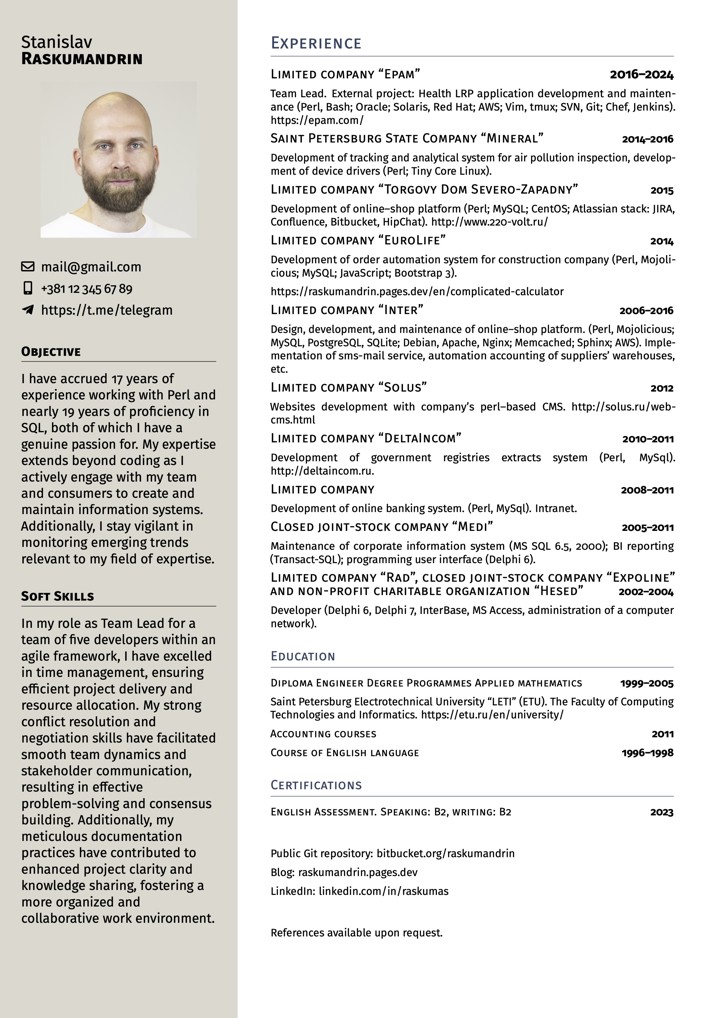
И исходник:
% !TeX spellcheck = en_GB
% !TeX program = pdflatex

\documentclass[11pt, a4paper]{article}

\usepackage[T1]{fontenc}     % We are using pdfLaTeX,
\usepackage[utf8]{inputenc}  % hence this preparation
\usepackage[british]{babel}
\usepackage[left = 0mm, right = 0mm, top = 8mm, bottom = -8mm]{geometry}
\usepackage[stretch = 25, shrink = 25, tracking=true, letterspace=30]{microtype}
\usepackage{graphicx}        % To insert pictures
\usepackage{xcolor}          % To add colour to the document
\usepackage{marvosym}        % Provides icons for the contact details
\usepackage{fontawesome5}
%\usepackage{fontspec}
%\setmainfont{Merriweather}
\usepackage[us]{datetime}
\renewcommand{\dateseparator}{, }

\usepackage{enumitem}        % To redefine spacing in lists
\setlist{parsep = 0pt, topsep = 0pt, partopsep = 1pt, itemsep = 1pt, leftmargin = 6mm}

\usepackage{FiraSans}        % Change this to use any font, but keep it simple
\renewcommand{\familydefault}{\sfdefault}

%%%%%%% USER COMMAND DEFINITIONS %%%%%%%%%%%%%%%%%%%%%%%%%%%
% These are the real workhorses of this template

\newcommand{\dates}[1]{\hfill\mbox{\footnotesize\textbf{#1}}}
\newcommand{\is}{\par\vskip.5ex plus .4ex} % Item spacing
\newcommand{\smaller}[1]{{\small$\diamond$\ #1}}
\newcommand{\headleft}[1]{\vspace*{3ex}\textsc{\textbf{#1}}\par%
    \vspace*{-1.5ex}\hrulefill\par\vspace*{0.7ex}}
\newcommand{\headright}[1]{\vspace*{2.5ex}\textsc{\Large#1}\par%
     \vspace*{-2ex}{\hrulefill}\par}
%%%%%%%%%%%%%%%%%%%%%%%%%%%%%%%%%%%%%%%%%%%%%%%%%%%%%%%%%%%%

\usepackage[colorlinks = true, urlcolor = black, linkcolor = black]{hyperref}

\begin{document}
\vspace{1.5cm}

% Style definitions -- killing the unnecessary space and adding the skips explicitly
\setlength{\topskip}{0pt}
\setlength{\parindent}{0pt}
\setlength{\parskip}{0pt}
\setlength{\fboxsep}{0pt}
\pagestyle{empty}
\raggedbottom


\hspace{0.5cm}
\begin{minipage}[t]{0.33\textwidth} %% Left column -- outer definition
%  Left column -- top dark rectangle
\colorbox{white}{\begin{minipage}[t][5mm][t]{\textwidth}\null\hfill\null\end{minipage}}

\vspace{-.2ex} % Eliminates the small gap

\colorbox{white}{\color{black}  %% LEFT BOX
\kern0.09\textwidth\relax% Left margin provided explicitly
\begin{minipage}[t][293mm][t]{0.82\textwidth}
\raggedright
\vspace*{2.5ex}

\Large Stanislav

\textbf{\textsc{Raskumandrin}} \normalsize

% Centering without extra vertical spacing
\null\hfill\includegraphics[width=0.80\textwidth]{gpt-avatar}\hfill\null

\vspace*{3ex} % Extra space after the picture

% https://ctan.org/pkg/fontawesome5
% http://mirrors.ibiblio.org/CTAN/fonts/fontawesome5/doc/fontawesome5.pdf

\noindent
\begin{tabular}{@{}c@{\hspace{0.5em}}l@{}}
\faEnvelope[regular] & \href{mailto:gmail@gmail.com}{gmail@gmail.com} \\[0.75ex]
\faMobile* & \href{tel:+381123456789}{+381\,12\,345\,67\,89} \\[0.75ex]
\faTelegramPlane & \href{https://t.me/telegram}{https://t.me/telegram}
\end{tabular}

\vspace*{0.75ex}

\headleft{Objective}
With 17 years in Perl and 19 in SQL, I build and maintain data systems that stay clear, stable, and practical.
I work closely with teams and users, keeping focus on real needs and reliable delivery.
Stay aware of new technologies that help make work faster and cleaner.

\headleft{LLM Use}
I use Copilot, agents, and different LLMs in daily work — for coding, text, and data tasks.
Each tool supports precision and saves time, helping me keep focus on logic instead of routine.

\headleft{Soft Skills}
As Team Lead for five developers in an agile environment, I excelled in time management, ensuring efficient project delivery. My conflict resolution and negotiation skills fostered smooth team dynamics and stakeholder communication, enabling effective problem-solving. Meticulous documentation also enhanced project clarity and collaboration.

\end{minipage}%
\kern0.09\textwidth\relax%%Right margin provided explicitly to stretch the colourbox
}
\end{minipage}% Right column
\hskip1.5em% Left margin for the white area
\begin{minipage}[t]{0.56\textwidth}
\setlength{\parskip}{0.8ex}% Adds spaces between paragraphs; use \\ to add new lines without this space. Shrink this amount to fit more data vertically

\vspace{2ex}

\headright{Experience}


\textsc{\normalsize Limited company “Epam”}  \dates{2016--2025}

\footnotesize Team Lead. External project: Health LRP application development and
maintenance (Perl, Bash; SQL, Oracle, Redis; Solaris, Red Hat; AWS; Vim, tmux; SVN, Git;
Chef, Jenkins, Docker; OpenTelemetry; Jira, Figma, Miro; SDLC, Scrum, SAFe, OWASP). https://epam.com/

\textsc{\normalsize Saint Petersburg State Company “Mineral”}  \dates{2014--2016}

\footnotesize Development of tracking and analytical system for air pollution
inspection, development of device drivers (Perl; Tiny Core Linux).

\textsc{\normalsize Limited company “Torgovy Dom Severo-Zapadny”}  \dates{2015}

\footnotesize Development of online–shop platform (Perl; MySQL; CentOS;
Atlassian stack: JIRA, Confluence, Bitbucket, HipChat). http://www.220-volt.ru/

\textsc{\normalsize Limited company “EuroLife”}  \dates{2014}

\footnotesize  Development of order automation system for construction company (Perl, Mojolicious;
MySQL; JavaScript; Bootstrap 3).

https://raskumandrin.pages.dev/en/complicated-calculator

\textsc{\normalsize Limited company “Inter”} \dates{2006--2016}

\footnotesize  Design, development, and maintenance of online–shop platform. (Perl, Mojolicious;
MySQL, PostgreSQL, SQLite; Debian, Apache, Nginx; Memcached; Sphinx; AWS). Implementation of sms-mail service,
automation accounting of suppliers' warehouses, etc.

\textsc{\normalsize Limited company “Solus”} \dates{2012}

\footnotesize Websites development with company's perl–based CMS. http://solus.ru/web-cms.html

\textsc{\normalsize Limited company “DeltaIncom”} \dates{2010--2011}

\footnotesize Development of government registries extracts system (Perl, MySql). http://deltaincom.ru.

\textsc{\normalsize Limited company} \dates{2008--2011}

\footnotesize Development of online banking system. (Perl, MySql). Intranet.

\textsc{\normalsize Closed joint-stock company “Medi”} \dates{2005--2011}

\footnotesize Maintenance of corporate information system (MS SQL 6.5, 2000); BI
reporting (Transact-SQL); programming user interface (Delphi 6).

\textsc{\normalsize Limited company “Rad”, closed joint-stock company “Expoline” and non-profit charitable organization “Hesed”}  \dates{2002--2004}

\footnotesize Developer (Delphi 6, Delphi 7, InterBase, MS Access, administration of a computer network).

\headright{\normalsize Education}

\textsc{Diploma Engineer Degree Programmes Applied mathematics} \dates{1999--2005}

\footnotesize Saint Petersburg Electrotechnical University “LETI” (ETU). The Faculty of Computing Technologies and
Informatics. https://etu.ru/en/university/

\textsc{Accounting courses} \dates{2011}

\textsc{Course of English language} \dates{1996--1998}


\headright{\normalsize Certifications}

\textsc{English Assessment. Speaking: B2, writing: B2} \dates{2023}


\headright{\normalsize Online Presence}

\noindent
\begin{tabular}{@{}c@{\hspace{0.5em}}l@{}}
\faGithub & Public Git repositories: \href{https://github.com/raskumandrin/}{github.com/raskumandrin}, \href{https://bitbucket.org/raskumandrin}{bitbucket.org/raskumandrin} \\[0.75ex]
\faBlogger & Blog: \href{https://raskumandrin.pages.dev/en}{raskumandrin.pages.dev/en} \\[0.75ex]
\faLinkedin & LinkedIn: \href{https://www.linkedin.com/in/raskumas/}{linkedin.com/in/raskumas}
\end{tabular}


\end{minipage}

\par\vspace{-8.4ex} % добавить немного вертикального отступа после колонок

\noindent\begin{center}
  {\color[gray]{0.9}\textsf{\fontseries{l}\selectfont Typeset with love in \LaTeX, \today}}

\end{center}
\vspace*{-2ex} % подгоняет расстояние, чтобы текст не уехал на новую страницу
\end{document}